
Breastfeeding & Baby Tracker
ParentLove Baby Tracker by CoquisoftParenting
4.94.31K Reviews
- Version
- 12.4.0
- Installs
- 100.00K
- Age Rating
- Everyone
Screenshots
Our Review of Breastfeeding & Baby Tracker
 Analysis by Appyee
Hey there, new parents and curious minds! If you’re diving into the world of parenting apps, you’ll want to check out the Breastfeeding & Baby Tracker. This app promises to simplify the chaotic yet beautiful journey of keeping track of your baby's needs. So, let’s get into the nitty-gritty of what this app offers and if it’s worth a spot on your smartphone.
Readability and navigation during a busy day
A baby tracker works best when it takes less effort to record a detail than to remember it, and that is the standard I would use when judging this app. Its appeal is the range of daily notes it brings together: feeding, diapers and sleep are central, with other baby-care records available too. Instead of keeping separate scraps of information in a notebook or trying to reconstruct a routine from memory, I can use one place to build a running record.
That breadth is useful, but it also asks parents to make a small choice: log everything, or track only what is currently helpful. I would start with the few categories that answer an immediate question, such as when the last feed happened or how long the baby has been asleep. Adding every possible note from day one can turn a helpful record into another task. A tracker should reduce mental clutter, not make a parent feel behind because an entry was missed.
In its parenting-app role, ParentLove Baby Tracker is aimed at practical routine-keeping rather than replacing a conversation with a clinician. I find that distinction important. A timeline can make it easier to describe a pattern at an appointment, but a log is still only a record of what someone entered. It should not be treated as a diagnosis or as a substitute for professional advice when a baby’s health is a concern.
Motor and sensory considerations
When someone is holding a newborn, working with one hand, or dealing with tired eyes, simple navigation matters more than decorative polish. The original app experience presents separate areas for different activities, which gives the basic job a clear shape: go to the relevant type of log and record what happened. That can be easier to understand than a blank diary, especially for a parent who is new to tracking feeds, changes and naps.
There is still a practical trade-off. Recording details repeatedly means using a phone at moments when a parent may be feeding, soothing or changing a baby. Some people will find quick entries reassuring; others will find any screen interaction distracting or awkward. I would not assume that a tracker is equally comfortable for every person or every physical situation. If tapping through records feels like work, it is reasonable to keep only the notes that genuinely help and use a simpler method for the rest.
For sensory comfort, the most useful question is whether the app’s prompts and visual layout feel manageable to the person using it. A reminder can help someone who loses track of time, but frequent prompts may be unwelcome to someone who prefers a quieter phone. I would adjust my use around that difference rather than letting notifications dictate the rhythm of care. Parents who need specific accessibility options should check the app directly on their device before building a routine around it.
Using a baby tracker in real family routines
I find a baby tracker most useful when it supports the handoff between caregivers, rather than asking either person to document every moment. In this section, I’ll focus on how a few consistent notes can make everyday routines easier to pick up, and why choosing what to record matters as much as having a record.
Sharing the record without making it another chore
A shared log has value when more than one caregiver takes responsibility for the same routine. If one parent feeds the baby before work and another takes over later, a common record can answer practical questions without relying on a half-remembered conversation. The benefit is not simply that both people can see entries; it is that they can hand over care with a clearer idea of what has already happened.
To keep that arrangement useful, I would agree on a simple household rule: record the events that affect the next caregiver’s decisions, and do it as soon as it is practical. If one person logs every detail while the other rarely opens the app, the record may look complete but still fail as a handoff tool. A brief, consistent note is more useful than a perfect system that only one tired parent can maintain.
For example, imagine a caregiver returning home in the evening and taking over while the other parent rests. A quick look at the recent feed, diaper and sleep entries can give a starting point for the next stretch of care. That does not mean the app makes the handoff effortless in every household: both caregivers need to use the same routine, and a missed entry can leave uncertainty. I would treat the shared timeline as a prompt for conversation, not as proof that every detail is current.
Choosing what to track, and what to leave out
One less obvious strength of a broad tracker is that it can help parents notice which records they actually consult. I would use it selectively for a week, then ask which entries changed a decision or made a conversation easier. If sleep notes are useful but a long list of minor activities is not, there is no reason to keep logging the latter just because the app can hold them. This trial-and-trim approach keeps the tracker from becoming a second job.
Feeding records can be especially useful when caregivers are trying to describe a routine clearly, while diaper and sleep notes can add context to the day. The trade-off is that logging introduces a layer of interpretation: people may record an event at different times or describe it differently. For a shared record, agreeing on what counts as an entry can prevent confusion. I would avoid treating small differences in logging as meaningful changes in the baby’s routine.
Families who prefer paper may still find a phone log convenient for quick handoffs, but the reverse can also be true. A notebook requires no app navigation and can suit someone who wants to keep the phone away during care. The tracker’s advantage is having several kinds of baby records together; its disadvantage, compared with a simple note, is the need to interact with an app and maintain the habit. The better choice depends on whether organization or low-friction recording matters more to you.
Getting Started with the App
First things first, downloading and setting up the Breastfeeding & Baby Tracker is a breeze. Available on both Android and iOS, you can grab it from the respective app stores. Once installed, you’ll find the interface user-friendly and intuitive, which is a lifesaver when you’re juggling a newborn and a mobile device. The app kicks off with a simple registration process where you enter some basic details about your baby and yourself. This step sets the stage for personalized tracking.
The app is free to download, and its age rating is Everyone. It is developed by ParentLove Baby Tracker by Coquisoft and sits in the parenting category. Its average rating is 4.9 from around eleven thousand ratings, alongside roughly four thousand one hundred written reviews, and it has over one hundred thousand installs. Those figures suggest that many families have tried it, but they cannot tell me whether its workflow will suit a particular household.
The app was released on October 31, 2015, and its current version is 10.5.2, with Android 5.0 as the minimum operating-system requirement. In-app purchases range from $9.99 to $39.99 per item. I would check the current options in the app before relying on any particular feature or assuming that every part of the experience is included at no cost. The free starting point makes it easier to explore, while the purchase range is worth considering if you want to avoid unexpected spending.
Features That Stand Out
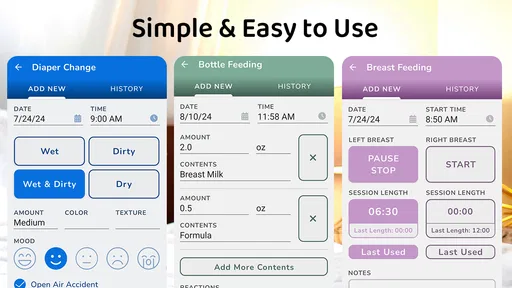
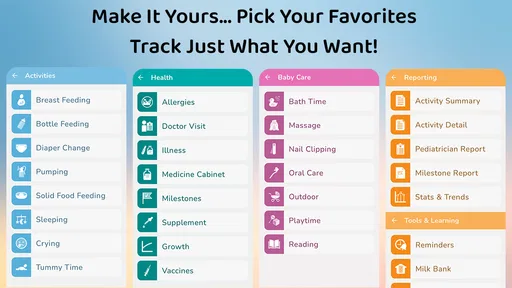
What truly sets this app apart are its comprehensive features. You can track everything from feeding times and diaper changes to sleep schedules and growth milestones. The app offers a timer function for breastfeeding sessions, which can be a game-changer for new moms trying to establish a routine. Plus, if you’re a fan of lists (and who isn’t when sleep-deprived?), the app lets you log all sorts of baby activities, so nothing slips through the cracks.
A timer can be more useful than a manually entered time when a feed starts during a tiring stretch of the day, because it reduces the need to remember details afterward. My practical tip would be to use it when duration matters to your own routine, not to turn every feed into a performance measure. A record is there to support a parent’s memory; it should not create pressure to make one day match another.
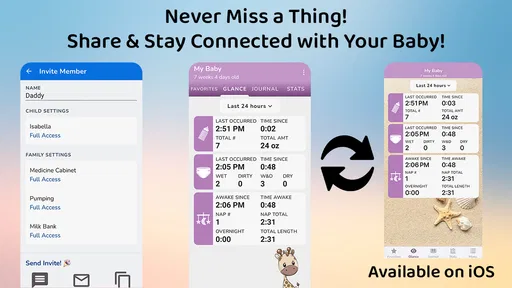
One of my favorite features is the ability to sync data. If you’re co-parenting, this can be a godsend. Both parents can access and update the baby’s activity logs, ensuring everyone’s on the same page. No more guessing who last fed or changed the baby!
Before depending on a shared record, I would make sure both caregivers know how they will handle missed or late entries. A timeline is only as useful as the information people put into it. This is a small but important limitation of any shared tracker: it can organize communication, but it cannot ensure that everyone remembers to communicate.
User Experience
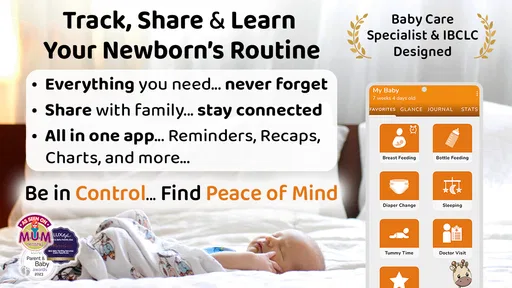
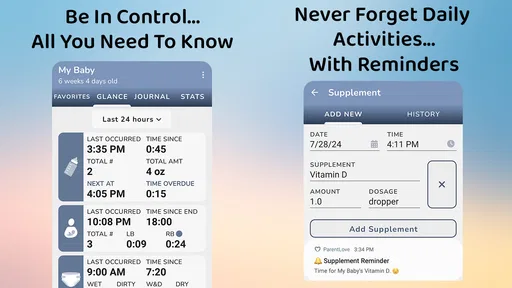
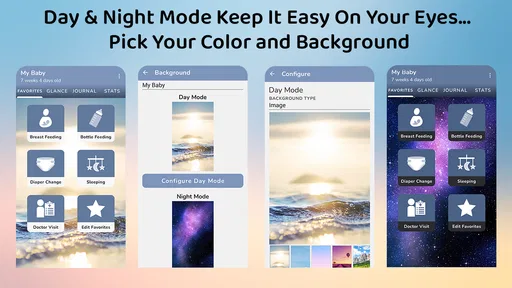
Let’s talk about the user experience. The design is sleek and modern, with pastel colors that are easy on the eyes. Navigating through the app is straightforward. You’ve got tabs for different functions, like feeding logs and diaper changes, making it super easy to switch between tasks. I found the prompts and reminders particularly helpful—those little nudges to log your baby's nap or feeding session are subtle yet effective.
Those nudges will suit some routines better than others. If I already have a reliable handoff with another caregiver, reminders may be less important; if I am caring for the baby alone and easily lose track of time, they may be more useful. I would treat prompts as optional support rather than a reason to keep the phone close at every moment. Anyone who finds reminders stressful should consider whether they can make the app work with fewer interruptions.
Compared with a basic notes app, this tracker is more structured for baby-care records, so it can be easier to scan several types of activity in one place. Compared with relying on memory alone, it gives caregivers a shared reference point. But a notes app or paper diary can be more flexible and less demanding for families who only need a couple of details. I would choose this app when its range of logs solves a real coordination problem, not simply because tracking everything sounds thorough.
Why It’s a Must-Have
So why should you consider downloading this particular tracker? Well, if you’re looking for a one-stop solution to manage all aspects of your baby’s daily routine, this app has you covered. Not to mention, it’s like having a digital diary for your baby’s early days, which can be fun to look back on. The app also includes a health section where you can log vaccinations and doctor’s appointments. This is incredibly useful for keeping track of your baby’s medical history without having to rifle through paper records.
That health log can help a parent prepare for an appointment by keeping dates and notes in one routine, especially when several caregivers share responsibility. I would still keep any essential medical documents and follow-up instructions in the form recommended by the healthcare professional. A personal log is handy for recall, but it is not a replacement for official records or medical guidance.
This app is likely to suit first-time parents who want structure, families sharing baby care, and anyone who finds it hard to remember a sequence of feeds, sleep and changes during a busy day. It may be less appealing to parents who dislike tracking, want to keep phone use away from feeding time, or only need one occasional reminder. If an app starts making care feel like data entry, a short paper note or a simple shared conversation may be the better fit.
Remaining barriers and my verdict
The main barrier I see is not a missing category of information; it is the effort of keeping a detailed record current. Newborn care is unpredictable, and no tracker can remove that reality. A missed entry does not mean the app has failed, but it can make a shared timeline less dependable until caregivers fill in the gap. I would use the records as a helpful guide, not as a complete account of every moment.
All in all, the Breastfeeding & Baby Tracker is a fantastic tool for new parents who want to keep tabs on their baby’s activities without getting overwhelmed. Its comprehensive tracking features, coupled with a user-friendly interface, make it a top choice in the crowded world of parenting apps. Whether you’re a first-time parent or adding another little one to the family, this app can help bring a bit more order to your life.
If you’re ready to streamline your parenting journey, go ahead and give it a try. You might just find it becomes an indispensable part of your daily routine!
Privacy and Permissions
See what permissions an app requests and how it handles your data.
- Photos/Media/Files
- read the contents of your USB storage, modify or delete the contents of your USB storage
- Storage
- read the contents of your USB storage, modify or delete the contents of your USB storage
- Wi-Fi connection information
- view Wi-Fi connections
- Other
- view network connections, read battery statistics, full network access, run at startup, prevent device from sleeping, set an alarm
Verdict
Strengths of Breastfeeding & Baby Tracker
- Intuitive interface for easy tracking.
- Customizable reminders for feeding times.
- Supports multiple profiles for twins.
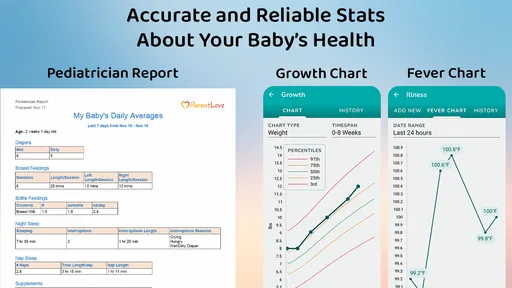
- Detailed growth charts for baby development.
- Offline mode available for convenience.
Limitations of Breastfeeding & Baby Tracker
- Limited free features; premium needed.
- No integration with wearable devices.
- Ads present in the free version.
- Initial setup can be time-consuming.
- Limited personalization options for charts.
Similar Picks in This Category
View All
Family Space
Motorola Mobility LLC.3.9

شرطة الأطفال - مكالمة وهمية
Oub Apps4.1

Findmykids: Parental Control
LETEM LTD4.6

Pregnancy + | Tracker App
Philips Electronics UK Limited4.8

Policía de niños - para padres
Kids police4.7

Pregnancy App
Amila4.9
Frequently Asked Questions
What features does the Breastfeeding & Baby Tracker app offer?
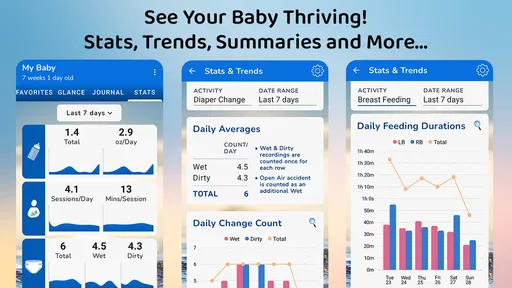
The Breastfeeding & Baby Tracker app provides a comprehensive set of features for new parents, including tracking breastfeeding sessions, diaper changes, sleep patterns, and baby growth. It also offers reminders for feedings and doctor appointments, along with detailed reports and statistics to monitor your baby’s development over time.
Is the Breastfeeding & Baby Tracker app user-friendly for new parents?
Yes, the app is designed with a user-friendly interface that makes it easy for new parents to navigate. With intuitive menus and clear instructions, parents can easily log information and access data quickly. The app also provides tips and tutorials for first-time users to ensure a seamless experience.
Does the app support multiple users or caregivers?
The Breastfeeding & Baby Tracker app allows multiple users to access and update the same baby profile. This feature is particularly useful for families where both parents or caregivers are involved in baby care, ensuring everyone stays informed and synchronized with the baby’s schedule and needs.
Is data privacy ensured with the Breastfeeding & Baby Tracker app?
Yes, the app places a strong emphasis on data privacy and security. It uses encryption to protect your data and offers options to create secure backups. Users can also control who has access to their information, ensuring that your baby’s data is kept private and secure.
Can I use the app offline, and will it sync data when online?
The Breastfeeding & Baby Tracker app can be used offline, allowing you to log information without an internet connection. Once you are back online, the app will automatically sync the data across all devices, ensuring that you always have the most up-to-date information available.
